
When a WORD (or EXCEL) document is added to the GVO that contains 'track changes' or 'comments' these are NOT normally visible in the preview of the document (nor in the Meeting Pack Download).
If you wish to have the 'Track Changes' and 'Comments' visible in the preview then save your WORD (or EXCEL) document in PDF format with the 'show track changes' option switched on on your computer and add that PDF file to the GVO - these will then be visible - see example below.
Note: You may need to check the 'save as' settings in WORD or EXCEL to have the comments showing. In the case of EXCEL you may need to 'Print to PDF' (with settings adjusted) to make the comments visible.

To save a WORD document as a PDF with the 'track changes' visible follow these steps...
1. In the WORD Document use File/Save As
2. Choose a location on your device (Desktop, Folder) to save the PDF
3. In the option boxes for Filename and Save as Type add the file name (maybe add 'track changes visible) and select PDF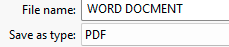
4. With the Save as Type set to PDF an 'Options' button will appear...
5. Open the options and select 'Document showing markup' 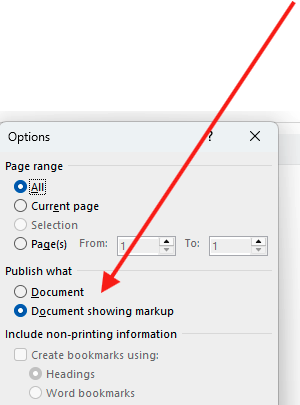
6. Save the PDF.
7. Load this PDF to GVO and the 'track changes' and 'Comments' will be visible in the preview and any meeting pack.
Note: On a 'Page' or a 'Policy' you can add the WORD document and also the PDF version (with track changes) - when the Policy is Final/Published both files would be visible and so the final, no track changes version must be there and nothing else.