
When a Policy is added to GVO it is good practice to add the start and end (expiry) dates and also assign Policy Owner(s).
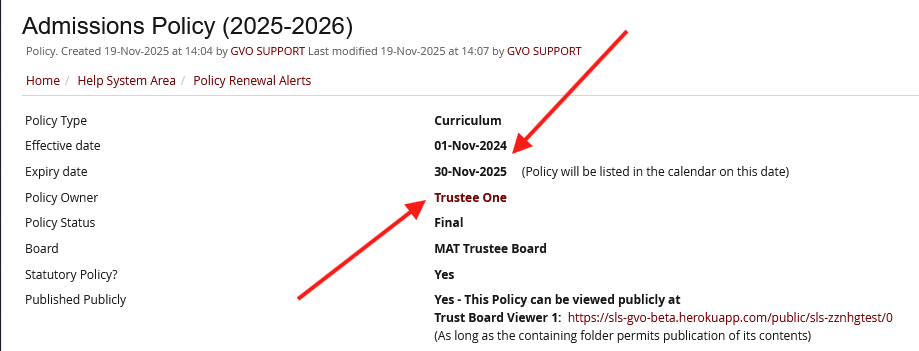
As the policy approaches the review date 'alerts' are created so that the policy renewal process can begin.
- The 'weekly newsletter' for the Policy owner(s) will contain the policies that are due for review in the next 60* days (or have already expired) and an additional flag if it is within 14 days.
* 60 days is the default setting but that can be changed by the local GVO manager if more, or less time is required.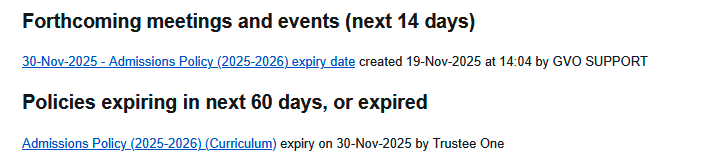
Note: The Policy Owners MUST have the weekly newsletter switched on in the user preferences for this to work.
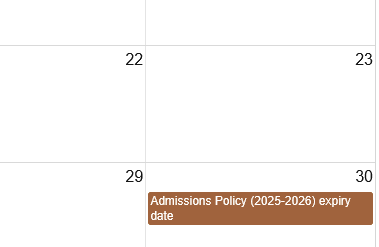
- The GVO Calendar will show the policy review date (visible to any user who can see the policy)...
- The 'Home Page' upcoming events section will also flag that a policy is due for review within the next 14 days - this is visible to ALL users that can see the policy - this provides an additional list of people who can see that a review is needed (in addition to the Policy Owner(s)).

Reports of future policy reviews can be created via the Policy Reporting Tool.
If you need any further help about policy renewal alerts please contact the GVO Support Desk on 01273 921066 or support@thegvoffice.com.